REPL
在本指南中,你将学习以下内容:
- 启动并操作 REPL 会话
- 导入模块并访问服务
- 使用内置的辅助方法
- 访问命令历史与结果
- 添加自定义 REPL 方法
- 使用编辑器模式
概述
AdonisJS REPL 在标准 Node.js REPL 的基础上进行了扩展,提供了感知应用(application-aware)的特性,让你能够轻松地与代码库进行交互。与基础的 Node.js REPL 不同,AdonisJS REPL 会启动你的应用、加载其服务,并为常见任务提供便捷的快捷方式。
REPL 在开发过程中对于快速试验、调试和数据探查尤其有用。你可以直接导入 TypeScript 文件、无需手动导入即可访问容器服务、通过 IoC 容器创建类实例,并使用针对你的应用自定义的专属方法扩展 REPL。
启动 REPL 会话
你可以使用 node ace repl 命令启动 REPL 会话。这会启动你的 AdonisJS 应用并打开一个交互式提示,你可以在其中执行代码。
node ace repl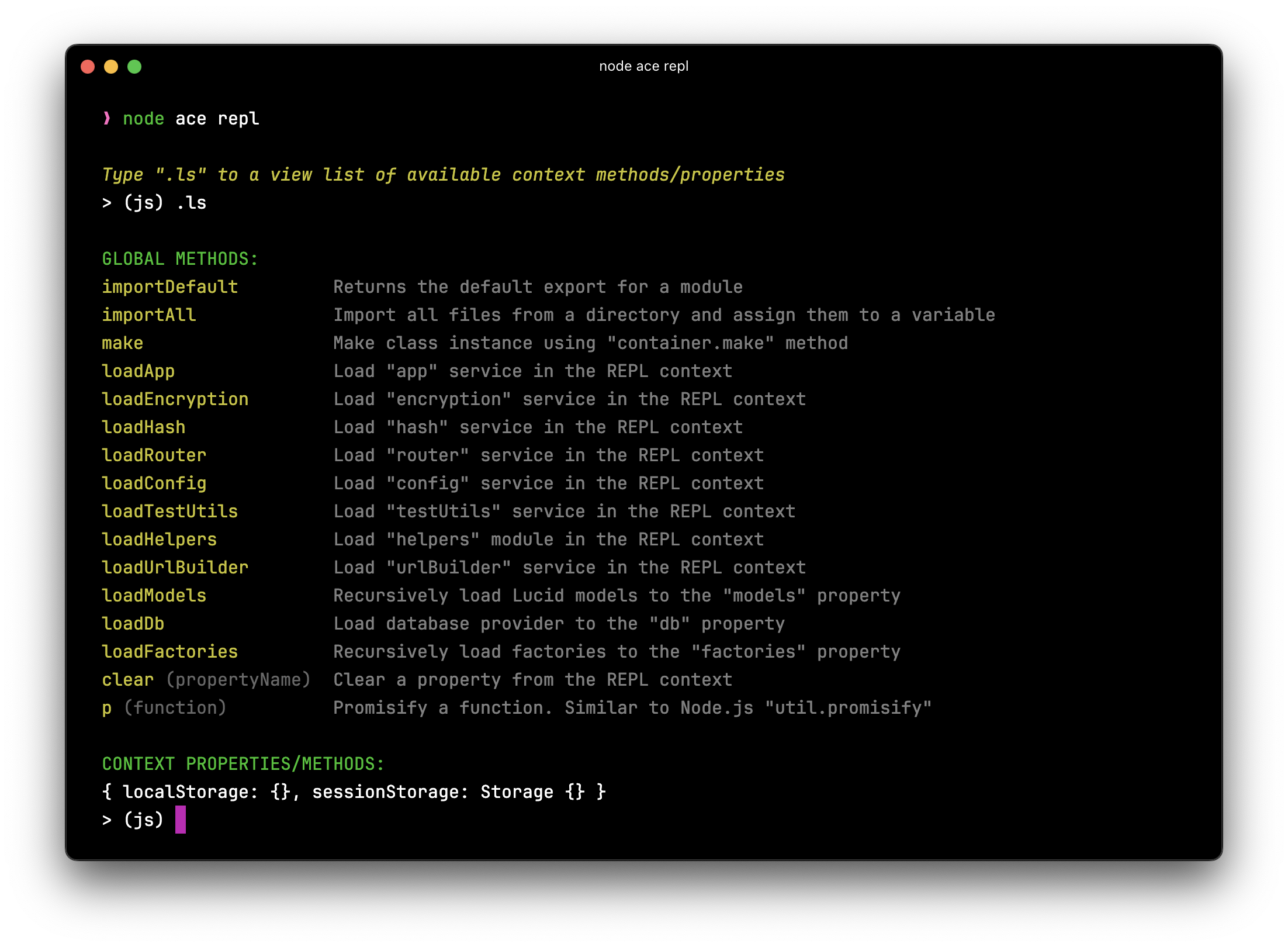
启动后,你会看到一个提示,可以在其中键入 JavaScript 代码并按 Enter 执行。输出会立即显示在下一行,为测试和探查提供了快速的反馈循环。
使用编辑器模式
虽然 REPL 对于单行表达式非常出色,但有时你需要编写多行代码块。编辑器模式允许你在执行之前编写多行代码。
在 REPL 提示中键入 .editor 命令即可进入编辑器模式。
> (js) .editor
# // Entering editor mode (Ctrl+D to finish, Ctrl+C to cancel)
在编辑器模式下,你可以编写多行代码。按 Ctrl+D 执行整个代码块,或按 Ctrl+C 取消并退出编辑器模式而不执行任何内容。
> (js) .editor

# // Entering editor mode (Ctrl+D to finish, Ctrl+C to cancel)
const users = await User.query()
  .where('isActive', true)
  .orderBy('createdAt', 'desc')
  .limit(10)

console.log(`Found ${users.length} active users`)
# // Press Ctrl+D to execute
访问之前的结果
REPL 提供了特殊变量,用于访问先前执行命令的结果和错误,这样当你忘记保存某个值时,就无需重新运行代码。
访问最后一个结果
如果你执行了一条语句但忘记将其结果赋给变量,可以使用 _(下划线)变量来访问它。
> (js) helpers.string.random(32)
# 'Z3y8QQ4HFpYSc39O2UiazwPeKYdydZ6M'

> (js) _
# 'Z3y8QQ4HFpYSc39O2UiazwPeKYdydZ6M'

> (js) _.length
# 32
当你想对某个结果执行额外操作而无需重新执行原始命令时,这尤其有用。
访问最后一个错误
类似地,你可以使用 _error 变量访问上一条命令抛出的任何异常。这有助于检查错误详情,而不会让你的代码被 try/catch 块弄得杂乱。
> (js) helpers.string.random()
# Error: The value of "size" is out of range...

> (js) _error.message
# 'The value of "size" is out of range. It must be >= 0 && <= 2147483647. Received NaN'

> (js) _error.stack
# (完整的错误堆栈跟踪)
浏览命令历史
REPL 会维护你执行过的所有命令的历史记录,并保存在主目录下的 .adonisjs_v7_repl_history 文件中。这让你能够回顾并重新执行先前的命令,而无需重新键入。
你可以通过两种方式浏览命令历史:
-
方向键导航:按上方向键
↑逐一循环浏览之前的命令。按下方向键↓可在历史中向前移动。 -
搜索模式:按
Ctrl+R进入反向搜索模式,然后键入字符以在历史中搜索匹配的命令。再次按Ctrl+R可循环浏览多个匹配项。
> (js) [Press Ctrl+R]
(reverse-i-search)`query': const users = await User.query()
退出 REPL 会话
你可以通过键入 .exit,或快速连按两次 Ctrl+C 来退出 REPL 会话。
> (js) .exit
# Goodbye!
退出时,AdonisJS 会执行优雅关闭,在进程终止之前关闭数据库连接并清理资源。
请注意,当你修改代码库时,REPL 会话不会自动重新加载。如果你更改了应用代码,必须退出并重启 REPL 会话才能使更改生效。
导入模块
Node.js 在 REPL 会话中不支持 import 语句,因此你必须改用动态的 import() 表达式。导入时,你需要解构模块导出或访问特定属性。
> (js) const { default: User } = await import('#models/user')
# undefined

> (js) await User.all()
# [User, User, User, ...]
语法 const { default: User } 解构了模块的默认导出。当你只想要默认导出时,这种方式显得有些冗长。
使用 importDefault 辅助方法
为了简化默认导出的导入,REPL 提供了一个 importDefault 辅助方法,它会自动提取默认导出。
> (js) const User = await importDefault('#models/user')
# undefined

> (js) const Post = await importDefault('#models/post')
# undefined

> (js) await Post.query().where('published', true)
# [Post, Post, Post, ...]
当你使用模型、服务或任何导出单一默认值的模块时,这尤为方便。
使用辅助方法
REPL 包含多个内置辅助方法,为常见任务(如导入服务、创建类实例以及管理 REPL 上下文)提供快捷方式。
你可以通过键入 .ls 命令查看所有可用的辅助方法。
> (js) .ls

# GLOBAL METHODS:
importDefault         Returns the default export for a module
make                  Make class instance using "container.make" method
loadApp               Load "app" service in the REPL context
loadEncryption        Load "encryption" service in the REPL context
loadHash              Load "hash" service in the REPL context
loadRouter            Load "router" service in the REPL context
loadConfig            Load "config" service in the REPL context
loadTestUtils         Load "testUtils" service in the REPL context
loadHelpers           Load "helpers" module in the REPL context
clear                 Clear a property from the REPL context
p                     Promisify a function. Similar to Node.js "util.promisify"
加载服务
无需手动导入服务,你可以使用 load* 辅助方法将它们加载到 REPL 上下文中。
> (js) await loadRouter()
# Imported router. You can access it using the "router" property

> (js) router.toJSON()
# { routes: [...], ... }

> (js) await loadHash()
# Imported hash. You can access it using the "hash" property

> (js) await hash.make('secret')
# '$argon2id$v=19$m=65536,t=3,p=4$...'
每个 load* 方法都会导入相应的服务,并将其作为 REPL 上下文中的一个属性提供,从而免去了 import 语句的需要。
创建类实例
make 方法使用
IoC 容器
来创建类实例并自动完成依赖注入。
> (js) const userService = await make('App/Services/UserService')
# undefined

> (js) await userService.findById(1)
# User { id: 1, email: 'user@example.com', ... }
当你想要测试带有构造函数依赖的服务或类时,这很有用,因为容器会自动解析并注入这些依赖。
将函数 Promise 化
p 方法将基于回调的函数 Promise 化,类似于 Node.js 的 util.promisify。
> (js) const readFile = p(fs.readFile)
# undefined

> (js) await readFile('package.json', 'utf8')
# '{ "name": "my-app", ... }'
添加自定义 REPL 方法
你可以用针对你的应用自定义的专属方法来扩展 REPL。这对于创建在开发过程中频繁使用的快捷方式(例如加载所有模型或填充测试数据)很有用。
自定义方法通常定义在一个 预加载文件 中,该文件仅在 REPL 环境下运行。
创建 REPL 预加载文件
首先,生成一个配置为仅在 REPL 环境下运行的预加载文件。
node ace make:preload repl -e=repl

# CREATE: start/repl.ts
定义自定义方法
在预加载文件中,使用 repl.addMethod 来定义自定义方法。例如,我们创建一个导入 app/models 目录下所有模型的方法。
import app from '@adonisjs/core/services/app'
import repl from '@adonisjs/core/services/repl'
import { fsImportAll } from '@adonisjs/core/helpers'

/**
 * 添加一个一次性加载所有模型的方法
 */
repl.addMethod(
  'loadModels',
  async () => {
    /**
     * 导入 models 目录下的所有文件
     */
    const models = await fsImportAll(app.makePath('app/models'))

    /**
     * 将模型暴露到 REPL 上下文中
     */
    repl.server!.context.models = models

    /**
     * 通知用户模型已加载
     */
    repl.notify(
      'Imported models. You can access them using the "models" property'
    )

    /**
     * 再次显示提示
     */
    repl.server!.displayPrompt()
  },
  {
    description: 'Load all models from app/models directory',
    usage: 'await loadModels()'
  }
)
repl.addMethod 接受三个参数:
- 方法名:在 REPL 中调用该方法时使用的名称
- 实现:执行该操作的异步函数
- 选项(可选):一个带有
description和usage属性的对象,会显示在帮助输出中
使用你的自定义方法
重启 REPL 会话后,你的自定义方法即可使用。
node ace repl

> (js) .ls
# GLOBAL METHODS:
# loadModels            Load all models from app/models directory
# ...

> (js) await loadModels()
# Imported models. You can access them using the "models" property

> (js) Object.keys(models)
# ['User', 'Post', 'Comment', ...]

> (js) await models.User.all()
# [User, User, User, ...]
你可以在同一个预加载文件中定义多个自定义方法,从而创建一套全面、契合你应用需求的开发快捷方式。